

Here’s the second part of my FME Golf follow up, where I showcase all of the entries from our users. I’ll get straight into it, so if you don’t know what this is about, I refer you to yesterday’s article.
Your Solutions
I saved all 14 entries to the root drive of my computer, to save you some characters, but I didn’t change the source paths if you hadn’t already. All I did was open each workspace and save it to 2016.1 to give everyone a level playing field.
Remember, the starting point of the challenge was a file 75,835 bytes in size. Here are the entries in the order I reviewed them.
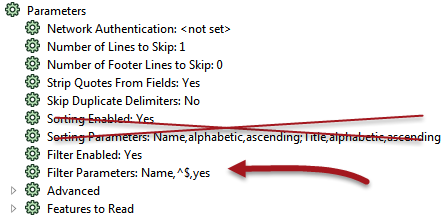 Rajesh Dhull: Rajesh didn’t do the extreme renaming I did, but his workspace did include one other change. Somehow I hadn’t noticed that the CSV reader has a parameter for filtering; use that and you can get rid of the Tester. Clever!
Rajesh also replaced the Sorter transformers by using a sort parameter on the CSV reader. That’s not so clever, I’m afraid. My original workspace sorted by neighborhood name, which isn’t part of the CSV. So I guess that means disqualification. Sorry. Without that his workspace checked in at exactly 70,000 bytes.
Lars de Vries: Lars spotted the coordinate settings in the CSV reader, enabling him to remove the VertexCreator, and also cottoned-on to the trick of moving everything to the root drive. He also used the CSV filter parameter. But the big change was replacing the CSV reader and the PointOnAreaOverlayer transformer with a FeatureReader transformer with built-in spatial query. Man! Why didn’t I see that. It blew my workspace away with a 2016.1 result of 47,519 bytes.
Tom Farrington: Tom did a whole bunch of renaming like I did, to cut down on individual bytes, and like other users he found the CSV filter and X/Y parameters. There was obviously some clear thinking but he didn’t use the FeatureReader and his workspace checks in at 67,995 bytes.
Dennis Wilhelm: Dennis did the file renaming trick and the objects in his workspace were squished together in the middle (although not totally overlaid). The same oddity that I found. But the big thing he did that I hadn’t noticed before was replacing the AttributeRenaming with manual attribute mapping. How much did that save I wonder? In all his file was reduced to 67,420 bytes.
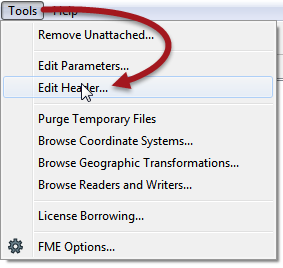 Kim van Winden: Kim is a developer, so I was expecting something impressive! He (she?) also used the FeatureReader transformer and renamed everything possible to reduce the bytes being stored. He removed user parameters, which had saved me a fair chunk of space, and “moved all transformers to the 0,0 location using the grid” so perhaps he deciphered how to arrange his transformers properly?
He also says he “chucked all comments out of the header” – I suspect he used the Edit Header tool, which is fine (why didn’t I think of it?!) and his file size: 45,974 bytes! A new leader.
Niek Goorman: Niek too used the FeatureReader (again, why didn’t I see that?!) and replaced the AttributeRenamer with manual mapping. A solid entry, but he didn’t go to the extremes of renaming that others did and he checks in with 53,214 bytes.
Nariman Emamian: Nariman – surrounded by FME gurus all shaving atom-sized parts off their workspaces – decided to go the other way and produce a workspace as large as possible! Nice try Nariman, but I think that puts you last in this contest, although top of the list for lateral thinking.
Roland Martin: Roland spotted some features that others hadn’t (for example the expanded attribute lists that I used) and used the CSV parameters and FeatureReader as the best workspaces have been doing. He also replaced the AttributeRenamer. His result? A very creditable 50,786 bytes.
Todd Davis: Todd filled my email inbox with three attempts, each improving upon the previous. His final workspace used a Generic Reader to read both source datasets. I hadn’t thought of that. It certainly saves a reader but at the cost of requiring extra transformers. He also replaced the AttributeRenamer and VertexCreator with an FMEFunctionCaller that called various functions such as @CopyAttributes. That’s fine. I did say functions are in the rules.
But what’s most remarkable is his file size: 35,229 bytes! That’s astounding. I’m going to try and replicate that because it is so much better than anyone else (so far…). His workspace is this:

Yves St Julien: Yves suggested the InlineQuerier would be a great solution if only it used Spatialite and not plain SQLite. We very well may implement that. Without that he still used that transformer and produced a reasonable result (it beat me) of 65,396 bytes.
Jonathan Moules: Jonathan got a file as small as 10kb, but only by taking rule-bending to a multitude of new dimensions. After I said you weren’t allowed to edit the fmw file by hand, he promptly created a second workspace to do that instead. Nice try, but I’m not going to allow that one – particularly since I can’t get the result to open in FME2016.1. Neither will I count compressing the workspace to a zip file. Or replacing the data with FFS datasets. Your first submission I will allow. It had the interesting idea of using the Textfile Reader instead of both the CSV and KML readers. I would never have thought of reading KML with a text reader. Unfortunately it means you need a whole slew of transformers to handle the data, and the workspace comes in at a hefty 124,525 bytes
<strong>Ulf M
أكثر...