
2.5 years ago we launched FME Cloud as a private beta. Since then we have come a long way – we’re out of beta – and we have seen a wide range of customer scenarios, e.g. supporting cloud-based open data solutions, powering an open data store and processing 3D data.
As more production environments are powered by FME Cloud, security requirements increase, and we have spent a lot of time creating tools to ensure your data is as secure as possible. In this post, I would like to give you some best practice recommendations on what you can do to maximize*the security of your FME Cloud account.
1. Activate two-factor authentication
If you care about security, you should really be using this! It adds an extra layer of security with no drawbacks (except that it takes you a couple seconds more to log in). We use the Time-based One-time Password Algorithm (TOTP), which can be used with different applications. The most popular one is probably the Google Authenticator (Google Play, App Store) but it is also the most basic. I personally prefer Authy (Google Play, App Store), which comes with an encrypted cloud backup. In case you lose your phone, the accounts can be restored on your new phone. If you prefer not to use a cloud backup, we do offer recovery codes in case your phone is unavailable.
Two-factor authentication can be activated in your Personal Settings.
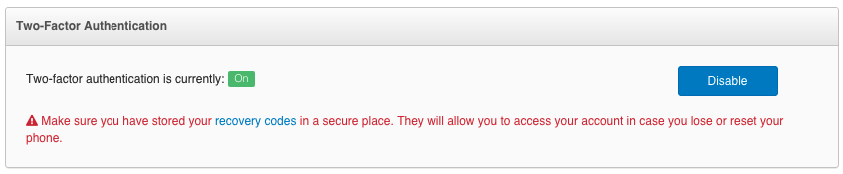 Enabling two-factor authentication in FME Cloud.
2. Create personal users in Team Management
We offer an unlimited amount of users per FME Cloud account, with different permission levels. I highly recommend creating personal users because:
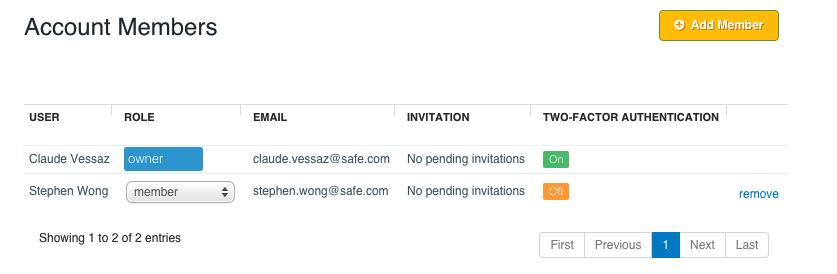 Managing users in FME Cloud.
3. Keep your email address up to date (and don’t filter emails from us)
We use emails to inform you about important events happening in your account. We send two different types of automatic notifications: account-level and user-level. Account-level emails are sent directly to the account owner when:
You can review and modify your email address in your Personal Settings.
4. Monitor instance activity and login history
We keep track of pretty much every action taken against any instance. Want to know who downloaded the credentials? Check the instance activity. Wondering who paused the production instance? Check the instance activity. The activity log is most effective if you use it in combination with personal users.
You can review an instance’s activity log in the Dashboard by selecting an instance and navigating to the Activity tab.
If there was an action initiated against your user but you are sure it was not you, we also keep track of the last ten successful logins, including IP address and location.
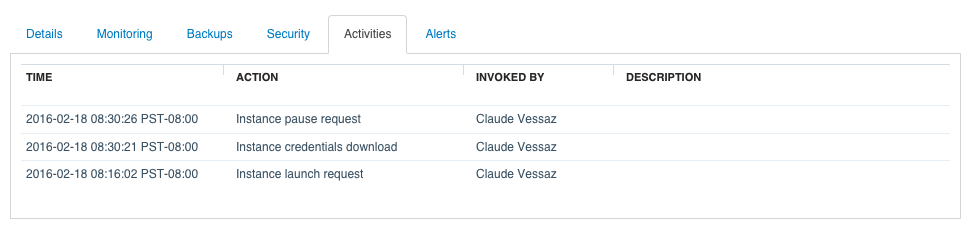 Checking the activity log in FME Cloud.
5. Treat the API token like a password
It allows access to the API, which has almost the same functionality of the dashboard. You can regenerate the token in your Personal Settings.
Final words
If you would like to know more about FME Cloud security, we have a whitepaper that explains in depth what we are doing to protect your account. That said, security always starts and ends with the people using the product, so I really recommend taking advantage of the security features we offer in FME Cloud. If you would like to see something else, or if you have suggestions for improvements, do not hesitate to contact us at support@safe.com.
The post FME Cloud: Five Steps for Improving Your Account Security appeared first on Safe Software Blog.

أكثر...
As more production environments are powered by FME Cloud, security requirements increase, and we have spent a lot of time creating tools to ensure your data is as secure as possible. In this post, I would like to give you some best practice recommendations on what you can do to maximize*the security of your FME Cloud account.
1. Activate two-factor authentication
If you care about security, you should really be using this! It adds an extra layer of security with no drawbacks (except that it takes you a couple seconds more to log in). We use the Time-based One-time Password Algorithm (TOTP), which can be used with different applications. The most popular one is probably the Google Authenticator (Google Play, App Store) but it is also the most basic. I personally prefer Authy (Google Play, App Store), which comes with an encrypted cloud backup. In case you lose your phone, the accounts can be restored on your new phone. If you prefer not to use a cloud backup, we do offer recovery codes in case your phone is unavailable.
Two-factor authentication can be activated in your Personal Settings.
Enabling two-factor authentication in FME Cloud.2. Create personal users in Team Management
We offer an unlimited amount of users per FME Cloud account, with different permission levels. I highly recommend creating personal users because:
- you don’t have to share passwords (and can use two-factor authentication).
- you will see who did what in the activity logs.
- you will get email notifications to the right email address.
- you can restrict permissions.
Managing users in FME Cloud.3. Keep your email address up to date (and don’t filter emails from us)
We use emails to inform you about important events happening in your account. We send two different types of automatic notifications: account-level and user-level. Account-level emails are sent directly to the account owner when:
- A new rule is added to an instance’s security group.
- The FME Cloud support team SSH’s into one of your instances (we never do this without asking for permission first).
- An annual subscription is expiring.
- The password was updated.
- The API token was regenerated
- An instance was launched and is ready to use.
You can review and modify your email address in your Personal Settings.
4. Monitor instance activity and login history
We keep track of pretty much every action taken against any instance. Want to know who downloaded the credentials? Check the instance activity. Wondering who paused the production instance? Check the instance activity. The activity log is most effective if you use it in combination with personal users.
You can review an instance’s activity log in the Dashboard by selecting an instance and navigating to the Activity tab.
If there was an action initiated against your user but you are sure it was not you, we also keep track of the last ten successful logins, including IP address and location.
Checking the activity log in FME Cloud.5. Treat the API token like a password
It allows access to the API, which has almost the same functionality of the dashboard. You can regenerate the token in your Personal Settings.
Final words
If you would like to know more about FME Cloud security, we have a whitepaper that explains in depth what we are doing to protect your account. That said, security always starts and ends with the people using the product, so I really recommend taking advantage of the security features we offer in FME Cloud. If you would like to see something else, or if you have suggestions for improvements, do not hesitate to contact us at support@safe.com.
The post FME Cloud: Five Steps for Improving Your Account Security appeared first on Safe Software Blog.
أكثر...