
Embedded maps and media are an inherent and essential part of any story map. But in certain cases you may want to embed more than just a map—you may want to embed another story map to help tell your story.
To embed, or not to embed?
Embedding a story map within a story map can be a powerful addition to telling your story, however, it is not always desirable. It can detract from your story, and create a more complicated experience for the viewer by presenting too many options, when a more streamlined approach might be better. But used prudently, embedding story maps within other story maps can add new context, detail, and complement your overall storytelling needs.
Of the story map choices, Story Map Journal and Story Map Series*make for good candidate hosts for embedding. The layouts of these two story maps delivers a good framework for effective use of an embedded story map.
Minimize before embedding
A consideration is that each Story Map has its own title, subtitle, and other application elements that might seem incongruous, or may duplicate other text when embedded. A URL parameter (&embed)*can be used to minimize the UI of the following templates: Story Map Tour, Story Map Swipe and Spyglass, and Story Map Series.
Minimizing the UI makes for a more streamlined appearance, and eliminates duplication of titles, descriptions, and other elements. Other story maps can be embedded, however the UI cannot be minimized.
The following link opens a Story Map Spyglass as normally configured:
http://story.maps.arcgis.com/apps/S...x.html?appid=fc64e3596bbd4d3caf865da6d77c386e
The following link opens a Story Map Spyglass using*&embed*to minimize the UI:
http://story.maps.arcgis.com/apps/S...?appid=fc64e3596bbd4d3caf865da6d77c386e&embed
Story Map Swipe and Spyglass is an ideal candidate to embed, offering simple and useful capabilities to compare two layers or maps.
An example – Story Map Swipe embedded in a Story Map Series
The following Story Map Series (using the tabbed layout) looks at unemployment by presenting three maps; unemployment rate, population change, and a map showing the correlation analysis between the two.

The modified version (shown below) of the same story map inserts a Story Map Swipe application at the third tab, allowing a visual comparison of unemployment and population prior to the final analysis map. The Story Map Swipe was added using the &embed URL parameter discussed earlier.

How to embed a Story Map Swipe
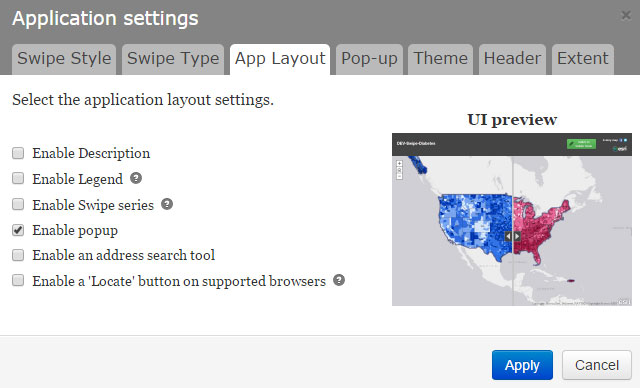
Begin by authoring a Story Map Swipe & Spyglass using the desired maps or layers. Both the Swipe or Spyglass layout options work equally well.*For the purposes of embedding, it is best to leave all App Layout settings checked off, except the pop-up (if one is desired).
Embed in Story Map Series
To embed a Story Map Swipe & Spyglass in a Story Map Series (as shown in the example above), follow the steps below.
1.*Add a new tab, entry, or bullet depending on the layout chosen, and enter a title.
2. Choose Web page.
3. Copy and paste the Story Map Swipe & Spyglass URL, making sure &embed is appended.
4. Click Configure.

5. Choose Fill (the default).
6. Click Add and complete the tab, entry, or bullet.

Embed in Story Map Journal
To embed a Story Map Swipe & Spyglass in a Story Map Journal follow the steps below.
1. Add a new Section, and in the Main Stage Content enter a title.
2. Choose Web page.
3.*Copy and paste the Story Map Swipe & Spyglass URL, and make sure*&embed*is appended.
4. Click Configure.

5. Choose Fill (the default).
6. Click Next to complete the new section.

Summary
Like adding seasoning to a fine meal, less is often more. Use embedded story maps within other story maps sparingly, and only when essential to tell your story. Always strive for simplicity when crafting a story map, a simple story is often the most effective. But with careful thought and planning, embedding can add additional meaning, context, and value.
For more information
This post was originally published April 2015, and has been updated.
أكثر...
To embed, or not to embed?
Embedding a story map within a story map can be a powerful addition to telling your story, however, it is not always desirable. It can detract from your story, and create a more complicated experience for the viewer by presenting too many options, when a more streamlined approach might be better. But used prudently, embedding story maps within other story maps can add new context, detail, and complement your overall storytelling needs.
Of the story map choices, Story Map Journal and Story Map Series*make for good candidate hosts for embedding. The layouts of these two story maps delivers a good framework for effective use of an embedded story map.
Minimize before embedding
A consideration is that each Story Map has its own title, subtitle, and other application elements that might seem incongruous, or may duplicate other text when embedded. A URL parameter (&embed)*can be used to minimize the UI of the following templates: Story Map Tour, Story Map Swipe and Spyglass, and Story Map Series.
Minimizing the UI makes for a more streamlined appearance, and eliminates duplication of titles, descriptions, and other elements. Other story maps can be embedded, however the UI cannot be minimized.
The following link opens a Story Map Spyglass as normally configured:
http://story.maps.arcgis.com/apps/S...x.html?appid=fc64e3596bbd4d3caf865da6d77c386e
The following link opens a Story Map Spyglass using*&embed*to minimize the UI:
http://story.maps.arcgis.com/apps/S...?appid=fc64e3596bbd4d3caf865da6d77c386e&embed
Story Map Swipe and Spyglass is an ideal candidate to embed, offering simple and useful capabilities to compare two layers or maps.
An example – Story Map Swipe embedded in a Story Map Series
The following Story Map Series (using the tabbed layout) looks at unemployment by presenting three maps; unemployment rate, population change, and a map showing the correlation analysis between the two.
The modified version (shown below) of the same story map inserts a Story Map Swipe application at the third tab, allowing a visual comparison of unemployment and population prior to the final analysis map. The Story Map Swipe was added using the &embed URL parameter discussed earlier.
How to embed a Story Map Swipe
Begin by authoring a Story Map Swipe & Spyglass using the desired maps or layers. Both the Swipe or Spyglass layout options work equally well.*For the purposes of embedding, it is best to leave all App Layout settings checked off, except the pop-up (if one is desired).
Embed in Story Map Series
To embed a Story Map Swipe & Spyglass in a Story Map Series (as shown in the example above), follow the steps below.
1.*Add a new tab, entry, or bullet depending on the layout chosen, and enter a title.
2. Choose Web page.
3. Copy and paste the Story Map Swipe & Spyglass URL, making sure &embed is appended.
4. Click Configure.
5. Choose Fill (the default).
6. Click Add and complete the tab, entry, or bullet.
Embed in Story Map Journal
To embed a Story Map Swipe & Spyglass in a Story Map Journal follow the steps below.
1. Add a new Section, and in the Main Stage Content enter a title.
2. Choose Web page.
3.*Copy and paste the Story Map Swipe & Spyglass URL, and make sure*&embed*is appended.
4. Click Configure.
5. Choose Fill (the default).
6. Click Next to complete the new section.
Summary
Like adding seasoning to a fine meal, less is often more. Use embedded story maps within other story maps sparingly, and only when essential to tell your story. Always strive for simplicity when crafting a story map, a simple story is often the most effective. But with careful thought and planning, embedding can add additional meaning, context, and value.
For more information
This post was originally published April 2015, and has been updated.
أكثر...