
What is PosterGenius
This Version is PG1.5.11.0 (Note latest version wont work with this key)
PosterGenius® is a powerful, user-friendly software application that helps you create great
scientific posters in less than 10 minutes. PosterGenius® offers a workflow tailored to the
needs of everyone who creates a poster presentation.

Focus on your content. Let PosterGenius® do the rest.
* PosterGenius® separates the content from the design of the poster and enables the user to
focus on research results while the application automatically optimizes and manages all the
rest.
Edit your poster with unparalleled ease.
* Even after you have filled up your poster with content you can change dimensions, number of
columns and the overall look'n'feel with a single click.
Why PosterGenius
Your scientific poster should be informative and easy to read
* An effective scientific poster should promote your work and engage fellow conference
attendees in a constructive conversation with you once they read it. This helps your
professional development and can build the foundation for new collaborations.
It takes the burden away and lets you focus on your content.
* PosterGenius™ has a dead-simple wizard guiding you through all the basic setup of your
poster. Forget about creating text boxes and moving them around. PosterGenius™ features a
powerful layout engine, which perfectly arranges and aligns your content in columns.
You won’t have to struggle with positioning your images and captions.
* PosterGenius™ automatically positions, scales and aligns your images and captions. You won’t
worry about making your poster look good. Automatically adjusts a series of typographic
parameters such as font-size, line-height and paragraph space to make the content
perfectly fit to the available space on the poster, while maintaining an esthetic result.
* Each time the user adds one or more images to the poster, PosterGenius® automatically arranges
them and calculates optimal image sizes given the poster dimensions, number of columns and a
series of other parameters
The best templates for your scientific posters
* PosterGenius® includes a library of 100+ professional templates for your scientific posters.
* The templates cover a variety of topics like Medicine, Science, Engineering, Nature and Art.
It’s easier and faster than any other software. And lets you focus on your content.
* PosterGenius™ brings the poster creation process down to what essentially is copy – pasting
your content into your poster.
* PosterGenius™ comes with some well-thought and targeted innovative tools that take your
scientific poster creation workflow to a whole new level and help you make your best posters
ever.
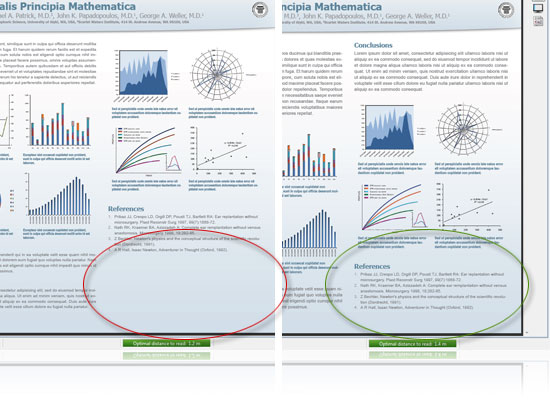
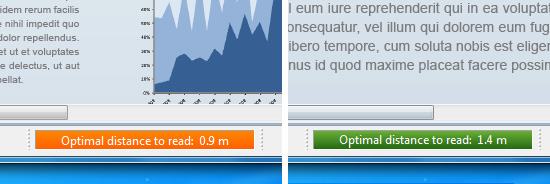
Optimal Reading Distance
* PosterGenius Informs you in real-time about the optimal distance your poster can be read
from. Never worry about selecting the appropriate fonts and font-sizes again. As a result, the
poster author is sure his text and graphs will be easily readable in the conference hall.

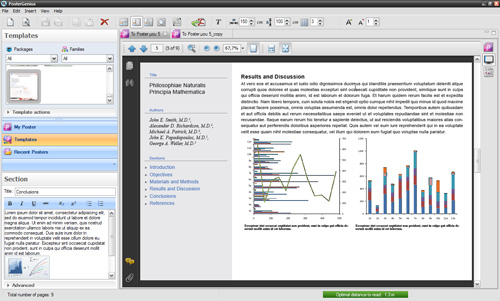
On-screen Review
* Instantly lays out your content in a way optimized for on-screen proofreading. Forget the
pain of constant zoom-in and out. Forget misspellings too.
Printout for Distribution
* Instantly formats your content like a scientific paper, so you can easily printout a copy of
your poster presentation and hand it out to fellow attendees in the conference. Learn more »
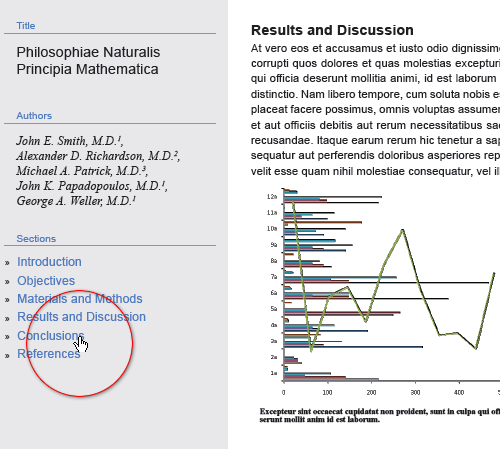
Content QuickReview
* Formats the content in a way which makes it easy to read and review on the computer screen
while providing easy navigation through poster sections.
e-poster ready
* PosterGenius® generates high quality e-posters that can be submitted and viewed on high-
resolution Plasma, LCD or LED Displays, at a growing number of conferences worldwide.
System requirements - Windows version
To run PosterGenius you will need a PC with the following characteristics at a minimum.
CPU 500 MHz or faster
RAM 256 MB (512 MB or more recommended)
Operating system Microsoft Windows® XP Service Pack 3, Windows Vista® and Windows 7
Graphics card 64 MB RAM or more
Disk Space 500 MB for the installation, 1 GB for use by the application
Minimum screen resolution 1024 x 768 (1280 x 800 or higher recommended)
Adobe® Reader® 7 or later (available for free at www.adobe.com) It will install this for you.
Internet connection for product activation NOT Applicable
A Cautionary Note: Whilst PosterGenius requires Adobe Reader, your existing default pdf
software menus will appear in the centre of the PosterGenius Layout, if this has editing
capabilities in the menus dont use them. YOU SHOULD ONLY USE the basic zoom page tools
OTHERWISE you will screw things up!!! Instead use the PosterGenius tools and the basic
tools as mentioned until you have the final poster to your liking.
Note you will need java installed to run med
Spoiler http://turbobit.net/16utztgdsqjb.html
http://hitfile.net/FI7xTHA
http://depositfiles.com/files/vnchfdffm
Portable version (takes a little while to boot up)
Spoiler http://turbobit.net/1agzsmb1q6xd.html
http://hitfile.net/OHN6WGx
http://depositfiles.com/files/7yaly861d
Home page - Where you find lots more information
hXXp://www.postergenius.com/cms/index.php
FINAL NOTE: you can use the upgrade menu to get 5 more templates BUT not to upgrade software
 Say Thanks If You Like the Post
أكثر...
This Version is PG1.5.11.0 (Note latest version wont work with this key)
PosterGenius® is a powerful, user-friendly software application that helps you create great
scientific posters in less than 10 minutes. PosterGenius® offers a workflow tailored to the
needs of everyone who creates a poster presentation.
Focus on your content. Let PosterGenius® do the rest.
* PosterGenius® separates the content from the design of the poster and enables the user to
focus on research results while the application automatically optimizes and manages all the
rest.
Edit your poster with unparalleled ease.
* Even after you have filled up your poster with content you can change dimensions, number of
columns and the overall look'n'feel with a single click.
Why PosterGenius
Your scientific poster should be informative and easy to read
* An effective scientific poster should promote your work and engage fellow conference
attendees in a constructive conversation with you once they read it. This helps your
professional development and can build the foundation for new collaborations.
It takes the burden away and lets you focus on your content.
* PosterGenius™ has a dead-simple wizard guiding you through all the basic setup of your
poster. Forget about creating text boxes and moving them around. PosterGenius™ features a
powerful layout engine, which perfectly arranges and aligns your content in columns.
You won’t have to struggle with positioning your images and captions.
* PosterGenius™ automatically positions, scales and aligns your images and captions. You won’t
worry about making your poster look good. Automatically adjusts a series of typographic
parameters such as font-size, line-height and paragraph space to make the content
perfectly fit to the available space on the poster, while maintaining an esthetic result.
* Each time the user adds one or more images to the poster, PosterGenius® automatically arranges
them and calculates optimal image sizes given the poster dimensions, number of columns and a
series of other parameters
The best templates for your scientific posters
* PosterGenius® includes a library of 100+ professional templates for your scientific posters.
* The templates cover a variety of topics like Medicine, Science, Engineering, Nature and Art.
It’s easier and faster than any other software. And lets you focus on your content.
* PosterGenius™ brings the poster creation process down to what essentially is copy – pasting
your content into your poster.
* PosterGenius™ comes with some well-thought and targeted innovative tools that take your
scientific poster creation workflow to a whole new level and help you make your best posters
ever.
Optimal Reading Distance
* PosterGenius Informs you in real-time about the optimal distance your poster can be read
from. Never worry about selecting the appropriate fonts and font-sizes again. As a result, the
poster author is sure his text and graphs will be easily readable in the conference hall.
On-screen Review
* Instantly lays out your content in a way optimized for on-screen proofreading. Forget the
pain of constant zoom-in and out. Forget misspellings too.
Printout for Distribution
* Instantly formats your content like a scientific paper, so you can easily printout a copy of
your poster presentation and hand it out to fellow attendees in the conference. Learn more »
Content QuickReview
* Formats the content in a way which makes it easy to read and review on the computer screen
while providing easy navigation through poster sections.
e-poster ready
* PosterGenius® generates high quality e-posters that can be submitted and viewed on high-
resolution Plasma, LCD or LED Displays, at a growing number of conferences worldwide.
System requirements - Windows version
To run PosterGenius you will need a PC with the following characteristics at a minimum.
CPU 500 MHz or faster
RAM 256 MB (512 MB or more recommended)
Operating system Microsoft Windows® XP Service Pack 3, Windows Vista® and Windows 7
Graphics card 64 MB RAM or more
Disk Space 500 MB for the installation, 1 GB for use by the application
Minimum screen resolution 1024 x 768 (1280 x 800 or higher recommended)
Adobe® Reader® 7 or later (available for free at www.adobe.com) It will install this for you.
Internet connection for product activation NOT Applicable
A Cautionary Note: Whilst PosterGenius requires Adobe Reader, your existing default pdf
software menus will appear in the centre of the PosterGenius Layout, if this has editing
capabilities in the menus dont use them. YOU SHOULD ONLY USE the basic zoom page tools
OTHERWISE you will screw things up!!! Instead use the PosterGenius tools and the basic
tools as mentioned until you have the final poster to your liking.
Note you will need java installed to run med
Spoiler http://turbobit.net/16utztgdsqjb.html
http://hitfile.net/FI7xTHA
http://depositfiles.com/files/vnchfdffm
Portable version (takes a little while to boot up)
Spoiler http://turbobit.net/1agzsmb1q6xd.html
http://hitfile.net/OHN6WGx
http://depositfiles.com/files/7yaly861d
Home page - Where you find lots more information
hXXp://www.postergenius.com/cms/index.php
FINAL NOTE: you can use the upgrade menu to get 5 more templates BUT not to upgrade software
أكثر...