
In an earlier post, we described how you can customize the Esri vector basemaps (now in beta release). *In that post, we provided an example of changing the colors for an existing map style to create a different look for the map, which will probably be the most common way in which the vector basemaps are customized. *We also shared the step-by-step instructions for how you can create a custom map.
In this post, we wanted to share examples for a couple other ways that you can customize the vector basemaps that were mentioned:
Given the ability to re-style vector basemaps, there are new and simpler ways to customize the maps so they better support both local and international users. *Rather than include two sets of labels on the map (e.g. Greek and English for Greece) to support both sets of users, you can have two separate styles (e.g. one with Greek, the other with English) and then present the appropriate one to the user based on their location or region preference. *Similarly, you can have separate styles that represent disputed boundaries differently to conform with international or local standards.
Custom Map with Local Languages
Below is an*example of a custom map*that has been created from one of the*available*Esri vector basemap tile layers.
In this example, the World Street Map tile layer was updated simply by changing the “text-field” value for a few layers in the map to show the local language (e.g. Greek) instead of the global language (e.g. English) at large scales (zoom out to see global language labels):
The source Esri Community Map data used to build the vector tiles has local language values populated for a number of feature classes in many places around the world. Throughout the Beta period, we plan to expand areas where local languages are available. There is a known limitation*currently where certain languages that display right-to-left scripts, such as Arabic, are not drawn properly. *View this web map, complete with bookmarks, showing some examples around the world that display with local languages at scales ~1:288k and larger.
Custom Map with Updated Boundaries
Below is an*example of a custom map*that has been created from another of the*available*Esri vector basemap tile layers.
In this example, the World Topographic Map tile layer was updated by changing the “filter” used for a couple types of administrative boundary layers to show the boundaries as they are recognized by the country of Suriname (though not by most other nations):
The source Esri Community Map data used to build the vector tiles has disputed boundaries defined for many areas around the world. View this*web map, complete with bookmarks for different regions, that show the set of disputed boundaries currently available in the Esri vector basemaps. *If you click on a specific boundary feature, you will see a popup with important information on the “DisputeID” (needed to update the “filter” as described above) along with*hints on how the boundary might be displayed for a different country perspective.
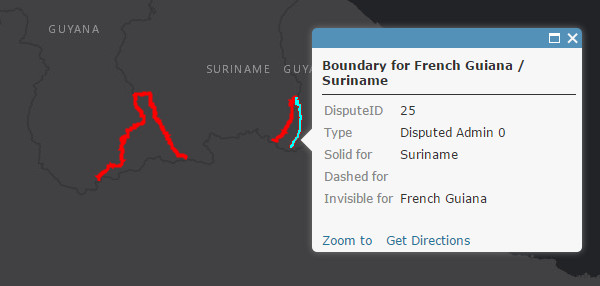 This map shows disputed boundaries in Esri vector basemaps, with info on boundary IDs and suggested rendering.
In the Esri vector basemaps, internationally recognized national boundaries (e.g. United States / Canada border) are typically represented with different types of “solid” lines while disputed boundaries (e.g. parts of French Guiana / Suriname border) are typically represented with “dashed” lines. *In some cases, a country will want to not render (i.e. make invisible) a disputed boundary that it does not recognize.
Sample Tile Layers
These examples are available in a Sample Vector Tile Layers group if you would like to view and download the styles. *We will add other vector tile layers to this group over time, including some that are created by users and shared with everyone. *If you create a layer that you would like to see included, please follow the best practices for sharing and include a tag of ‘vector style’ in your layer item.
More Customization Options
Additional tools will be available to customize vector basemaps to meet your specific needs. *More information and examples for how to customize map styles will be published in separate blog posts.
أكثر...
In this post, we wanted to share examples for a couple other ways that you can customize the vector basemaps that were mentioned:
- Change between language options available in selected areas
- Change the representation of disputed boundaries displayed in selected areas
Given the ability to re-style vector basemaps, there are new and simpler ways to customize the maps so they better support both local and international users. *Rather than include two sets of labels on the map (e.g. Greek and English for Greece) to support both sets of users, you can have two separate styles (e.g. one with Greek, the other with English) and then present the appropriate one to the user based on their location or region preference. *Similarly, you can have separate styles that represent disputed boundaries differently to conform with international or local standards.
Custom Map with Local Languages
Below is an*example of a custom map*that has been created from one of the*available*Esri vector basemap tile layers.
In this example, the World Street Map tile layer was updated simply by changing the “text-field” value for a few layers in the map to show the local language (e.g. Greek) instead of the global language (e.g. English) at large scales (zoom out to see global language labels):
- text-field entry for all instances of ‘name_global’ changed to ‘name_local’ (i.e. “text-field”: “{_name_local}”, )
- Cities, parks, landuse, and road labels are among several different feature classes capable of displaying local language in certain areas
The source Esri Community Map data used to build the vector tiles has local language values populated for a number of feature classes in many places around the world. Throughout the Beta period, we plan to expand areas where local languages are available. There is a known limitation*currently where certain languages that display right-to-left scripts, such as Arabic, are not drawn properly. *View this web map, complete with bookmarks, showing some examples around the world that display with local languages at scales ~1:288k and larger.
Custom Map with Updated Boundaries
Below is an*example of a custom map*that has been created from another of the*available*Esri vector basemap tile layers.
In this example, the World Topographic Map tile layer was updated by changing the “filter” used for a couple types of administrative boundary layers to show the boundaries as they are recognized by the country of Suriname (though not by most other nations):
- “Disputed admin0″ layers: changed the filter to be “filter” : ["!in", "DisputeID", 80, 23, 24, 25, 26, 0],
- this filter excludes (i.e filter ‘not in’) the disputed boundaries of 23, 24, 25, 26 in this “Disputed admin0″ (country-level) layer
- “Boundary line/Admin0″ layers: changed the filter to be “filter” : ["any", ["==", "_symbol", 0], ["in", "DisputeID", 24, 25]],
- this filter includes (i.e. filer ‘in’) the Suriname recognized boundaries of 24, 25*in this “Boundary line/Admin0″ layer
The source Esri Community Map data used to build the vector tiles has disputed boundaries defined for many areas around the world. View this*web map, complete with bookmarks for different regions, that show the set of disputed boundaries currently available in the Esri vector basemaps. *If you click on a specific boundary feature, you will see a popup with important information on the “DisputeID” (needed to update the “filter” as described above) along with*hints on how the boundary might be displayed for a different country perspective.
This map shows disputed boundaries in Esri vector basemaps, with info on boundary IDs and suggested rendering.In the Esri vector basemaps, internationally recognized national boundaries (e.g. United States / Canada border) are typically represented with different types of “solid” lines while disputed boundaries (e.g. parts of French Guiana / Suriname border) are typically represented with “dashed” lines. *In some cases, a country will want to not render (i.e. make invisible) a disputed boundary that it does not recognize.
Sample Tile Layers
These examples are available in a Sample Vector Tile Layers group if you would like to view and download the styles. *We will add other vector tile layers to this group over time, including some that are created by users and shared with everyone. *If you create a layer that you would like to see included, please follow the best practices for sharing and include a tag of ‘vector style’ in your layer item.
More Customization Options
Additional tools will be available to customize vector basemaps to meet your specific needs. *More information and examples for how to customize map styles will be published in separate blog posts.
أكثر...