
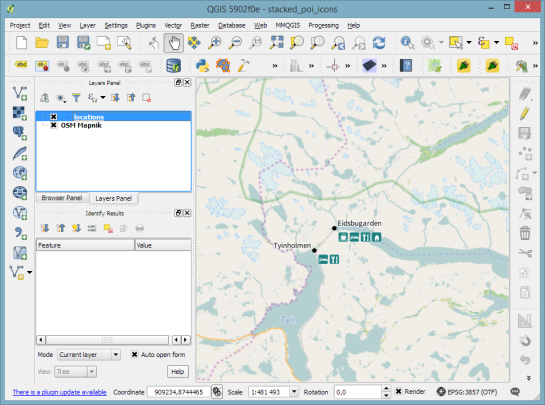
Today’s post was*motivated by a question on GIS.StackExchange, which is*looking for an automated way*to symbolize the amenities available at a location using a series of icons, like this:
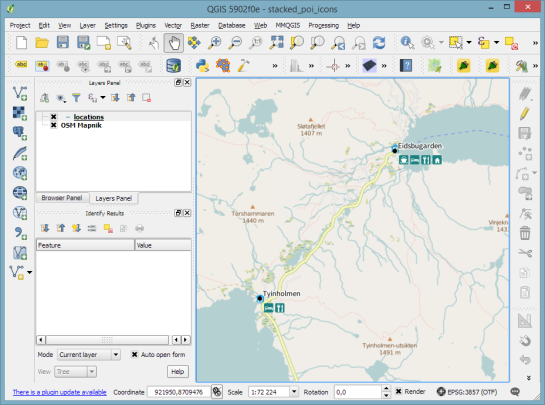
Assuming the information is available in *a format similar to this example attribute table
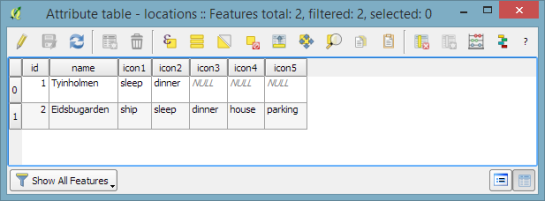
we can create a symbol, which adapts to the values in the icon columns using data-defined overrides:
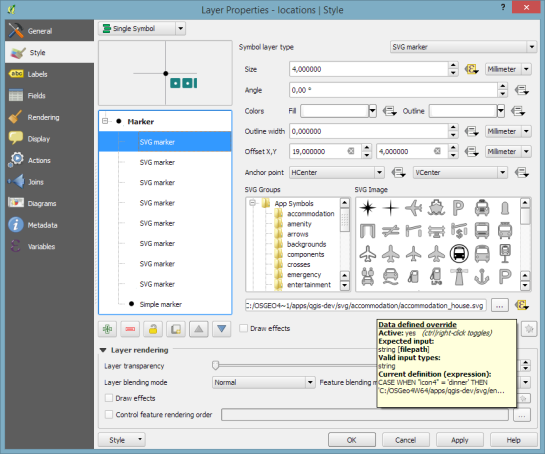
The five potential symbol locations are aligned next to each other using offsets. We use the following expression to determine the correct SVG symbol:
CASE WHEN "icon4" = 'dinner' THEN 'C:/OSGeo4W64/apps/qgis-dev/svg/entertainment/amenity=restaurant.svg'WHEN "icon4" = 'sleep' THEN 'C:/OSGeo4W64/apps/qgis-dev/svg/accommodation/accommodation_hotel2.svg'WHEN "icon4" = 'ship' THEN 'C:/OSGeo4W64/apps/qgis-dev/svg/transport/amenity=ferry_terminal.svg'WHEN "icon4" = 'house' THEN 'C:/OSGeo4W64/apps/qgis-dev/svg/accommodation/accommodation_house.svg' ELSE ''ENDTo hide icons if the icon value is NULL, the marker size is set to 0.
Finally, to ensure that the labels don’t cover the icons, we can use the cartographic label placement with the position priority set to ‘TR,TL,BL’, which restricts labels to the top right, top left, and bottom left position.
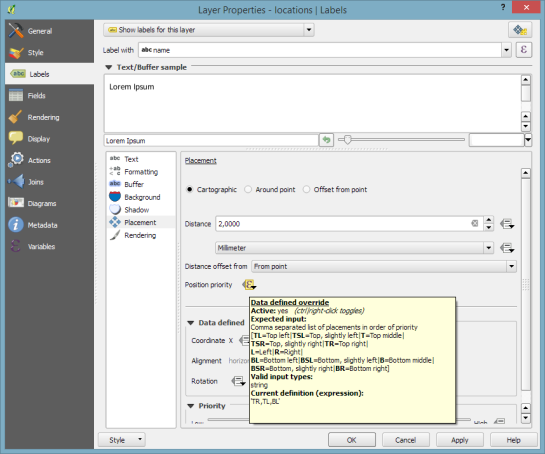
With this settings in place, we can zoom out and the labeling algorithm picks the most suitable position from the list of allowed positions:
For more cartography tips and tricks check my new book QGIS Map Design*or join my QGIS training courses.


أكثر...
Assuming the information is available in *a format similar to this example attribute table

we can create a symbol, which adapts to the values in the icon columns using data-defined overrides:
The five potential symbol locations are aligned next to each other using offsets. We use the following expression to determine the correct SVG symbol:
CASE WHEN "icon4" = 'dinner' THEN 'C:/OSGeo4W64/apps/qgis-dev/svg/entertainment/amenity=restaurant.svg'WHEN "icon4" = 'sleep' THEN 'C:/OSGeo4W64/apps/qgis-dev/svg/accommodation/accommodation_hotel2.svg'WHEN "icon4" = 'ship' THEN 'C:/OSGeo4W64/apps/qgis-dev/svg/transport/amenity=ferry_terminal.svg'WHEN "icon4" = 'house' THEN 'C:/OSGeo4W64/apps/qgis-dev/svg/accommodation/accommodation_house.svg' ELSE ''ENDTo hide icons if the icon value is NULL, the marker size is set to 0.
Finally, to ensure that the labels don’t cover the icons, we can use the cartographic label placement with the position priority set to ‘TR,TL,BL’, which restricts labels to the top right, top left, and bottom left position.
With this settings in place, we can zoom out and the labeling algorithm picks the most suitable position from the list of allowed positions:

For more cartography tips and tricks check my new book QGIS Map Design*or join my QGIS training courses.
أكثر...