
This article is a quick summary of a browser-based location applications that have been discussed on the Using GIS in SAR Discussion Group.
These are free apps that can be used to locate persons that need help in certain circumstances. It is a good idea to get familiar with all three as they can be used in different circumstances.
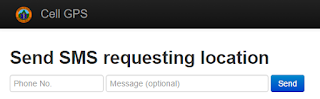
CellGPS (Eric Menendez @ericrmenendez)
Cellular device geolocation web app http://login.cellgps.org powered by Twilio, also on GitHub cell-gps. This app is very simple. It basically sends a text message to a cell phone, requests to activate GPS, then sends maps of coordinates of SMS reply.
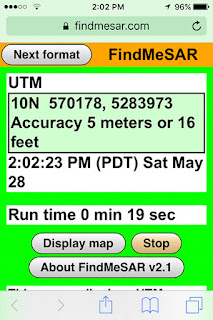
FindMeSAR (Joseph Elfelt @MappingSupport)
"Any 911 dispatcher can ask a wireless caller to browse to "findmesar.com", open that web page and soon read off their coordinates usually with a 10 meter or better location accuracy."
The person who needs help has to be told by voice or text to browse to findmesar.com and might need to give permission for their browser or the app to use location services. If the user cannot get online with their browser, then the app will not work.
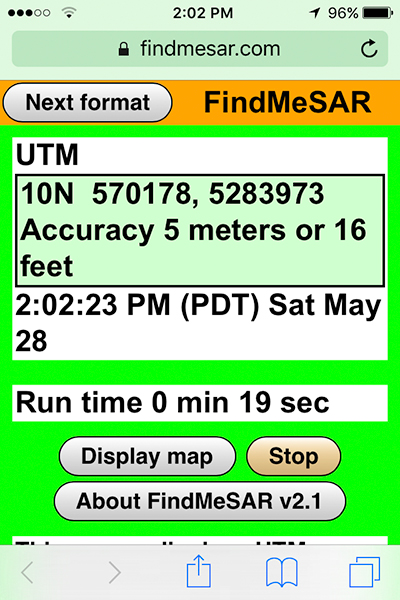
The “Next format” button cycles through four coordinate formats including USNG (same as MGRS). Each coordinate format has a different colored screen.
The app continuously asks the API for the user’s location. The first location displayed will likely have a high accuracy. If the user is outside or even next to a window, then in well under a minute the accuracy value will usually be 10 meters or less.
The person who needs help has to read or text the coordinates and accuracy to whoever is receiving their information.
There is more documentation at:
https://findmesar.com/p/911-wireless-location-accuracy.html
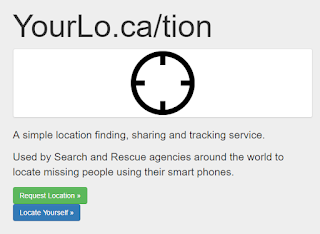
YourLo.ca/tion (Michael Coyle @Michael_F_Coyle)
"Free" mode: users can go to the web site, and generate an URL. You text the URL to the lost person. The web page loads, determines the location, and sends you the location via email.
"Advanced" mode:
Key Message
All three apps use the same browser geolocation API. That API uses the cell phone’s location services to obtain (1) latitude longitude coordinates in decimal degrees and (2) accuracy in meters. If you draw a circle at the coordinate and use the accuracy value for the radius then the specification says there is supposed to be a 95% likelihood that the cell phone is inside that circle."
For documentation on that API see:
http://www.w3.org/TR/geolocation-API/
Finally, George Durkee and the NAPSG Search and Rescue Working Group are putting together the "Operational Guide to Cell Phones for SAR" a living document that should be extremely helpful for SAR Teams in the coming months. Stay tuned for more details.
أكثر...
These are free apps that can be used to locate persons that need help in certain circumstances. It is a good idea to get familiar with all three as they can be used in different circumstances.
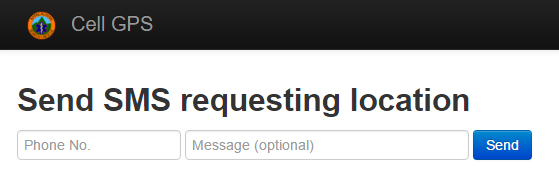
CellGPS (Eric Menendez @ericrmenendez)
Cellular device geolocation web app http://login.cellgps.org powered by Twilio, also on GitHub cell-gps. This app is very simple. It basically sends a text message to a cell phone, requests to activate GPS, then sends maps of coordinates of SMS reply.
FindMeSAR (Joseph Elfelt @MappingSupport)
"Any 911 dispatcher can ask a wireless caller to browse to "findmesar.com", open that web page and soon read off their coordinates usually with a 10 meter or better location accuracy."
The person who needs help has to be told by voice or text to browse to findmesar.com and might need to give permission for their browser or the app to use location services. If the user cannot get online with their browser, then the app will not work.
The “Next format” button cycles through four coordinate formats including USNG (same as MGRS). Each coordinate format has a different colored screen.
The app continuously asks the API for the user’s location. The first location displayed will likely have a high accuracy. If the user is outside or even next to a window, then in well under a minute the accuracy value will usually be 10 meters or less.
The person who needs help has to read or text the coordinates and accuracy to whoever is receiving their information.
There is more documentation at:
https://findmesar.com/p/911-wireless-location-accuracy.html
YourLo.ca/tion (Michael Coyle @Michael_F_Coyle)
"Free" mode: users can go to the web site, and generate an URL. You text the URL to the lost person. The web page loads, determines the location, and sends you the location via email.
"Advanced" mode:
- Agency signs in and creates a new request. Form auto-fills details and includes a field to reference a unique ID for the request.
- Agency sends text to subject via the web (back end is Twilio)
- Agency monitors the request on the monitor page
- When subject loads the web page, location is "pushed" to the monitoring page.
- Location displays on google maps
- Page "pings"
- Estimated error displayed
- Coordinates in Lat/Lon and UTM
- Can download GPX / KML
- Send and receive SMS with subjects
- SMS log with subjects
(By Joseph Elfelt)
"It is likely that no one app will always be best suited for all circumstances. I invite everyone to take a look at these apps and get a sense for what they do and how they do it. Then when a SAR mission comes along you will be able to make a well-informed choice as to whether any of these apps will be helpful.
All three apps use the same browser geolocation API. That API uses the cell phone’s location services to obtain (1) latitude longitude coordinates in decimal degrees and (2) accuracy in meters. If you draw a circle at the coordinate and use the accuracy value for the radius then the specification says there is supposed to be a 95% likelihood that the cell phone is inside that circle."
For documentation on that API see:
http://www.w3.org/TR/geolocation-API/
Finally, George Durkee and the NAPSG Search and Rescue Working Group are putting together the "Operational Guide to Cell Phones for SAR" a living document that should be extremely helpful for SAR Teams in the coming months. Stay tuned for more details.
أكثر...